
Step-by-Step Walkthrough
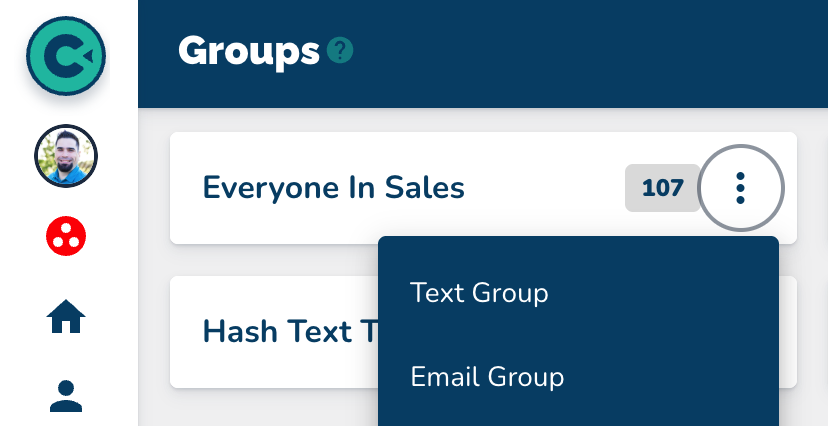
Navigate to the Groups page.
On the card of the group that you want to send the email to, click the three dots on the far right.
Select Email Group.
Add your subject.
Add your body.
Send your message.
This walkthrough answers the questions: How do I email a group? How do I send an email to a group of people? How do I send an email to my contacts?
Navigate to the Groups page.
On the card of the group that you want to send the email to, click the three dots on the far right.
Select Email Group.
Add your subject.
Add your body.
Send your message.

Quick How To's
This step-by-step walkthrough answers the questions: "How do I add a contact?", "How do I add a single contact?", and "How do I add one contact?"

Quick How To's
This step-by-step walkthrough answers the questions: "How do I import a list of contacts?", and "How do I add multiple contacts at once?"
Quick How To's
This step-by-step walkthrough answers the questions: "How do I update a contact?", "How do I change a contact's status?", and "How do I edit a contact's information?"
Quick How To's
This step-by-step walkthrough answers the questions: "How do I find a contact?", "How do I contacts?", and "Is there a way to search for people?"